wxPython学习笔记
A wx.Frame is a top-level window.
When people talk about GUIs, they usually speak of windows, menus and icons. Naturally then, you would expect that wx.Window should represent a window on the screen. Unfortunately, this is not the case. A wx.Window is the base class from which all visual elements are derived (buttons, menus, etc) and what we normally think of as a program window is a wx.Frame. This is an unfortunate inconsistency that has led to much confusion for new users.
Within a frame, you’ll use a number of wxWindow sub-classes to flesh out the frame’s contents. Here are some of the more common elements you might want to put in your frame:
- A
wx.MenuBar, which puts a menu bar along the top of your frame. - A
wx.StatusBar, which sets up an area along the bottom of your frame for displaying status messages, etc. - A
wx.ToolBar, which puts a toolbar in your frame. - Sub-classes of
wx.Control. These are objects which represent user interface widgets (ie, visual elements which display data and/or process user input). Common examples ofwx.Controlobjects includewx.Button,wx.StaticText,wx.TextCtrlandwx.ComboBox. - A
wx.Panel, which is a container to hold your variouswx.Controlobjects. Putting yourwx.Controlobjects inside awx.Panelmeans that the user can tab from one UI widget to the next.
All visual elements (wxWindow objects and their subclasses) can hold sub-elements. Thus, for example, a wx.Frame might hold a number of wx.Panel objects, which in turn hold a number of wx.Button, wx.StaticText and wx.TextCtrl objects,
A sizer is a way of laying out windows, it is not a window in itself.
what is panel?
“A panel is a window on which controls are placed. It is usually placed within a frame. It contains minimal extra functionality over and above its parent class
wxWindow; its main purpose is to be similar in appearance and functionality to a dialog, but with the flexibility of having any window as a parent.”, in fact, it is a simple window used as a (grayed) background for other objects which are meant to deal with data entry. These are generally known as Controls or Widgets.
几乎所有的wx.Control貌似都有label啊,pos啊,style啊这几个参数。
Improve the layout
WxPython has very rich vocabulary of objects to lay out controls.
wx.BoxSizeris the most common and simple layout object but it permits a vast range of possibilities. Its role is roughly to arrange a set of controls in a line or in a row and rearrange them when needed (i.e. when the global size is changed).wx.GridSizerandwx.FlexGridSizerare two very important layout tools. They arrange the controls in a tabular layout.
Applications can be created for four different areas.

wxPython consists of the five basic modules.
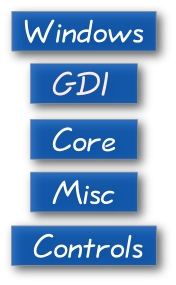
- The Windows module consists of various windows that form an application, for instance a Panel, a Dialog, a Frame, or a Scrolled Window.
- The Graphics Device Interface (GDI) is a set of classes used for drawing onto the widgets. This module contains classes for manipulation of Fonts, Colors, Brushes, Pens or Images.
- The Core module consists of elementary classes that are used in development. These classes include the Object class, which is the mother of all classes, Sizers, which are used for widget layout, Events, basic geometry classes like Point and Rectangle.
- The Misc module contains of various other classes and module functions. These classes are used for logging, application configuration, system settings, working with display or joystick.
- Controls module provides the common widgets found in graphical applications. For example a Button, a Toolbar, or a Notebook. Widgets are called controls under Windows OS.
Widgets are essential building blocks of a GUI application. Under Windows widgets are calles controls
- 原文作者:比克王国
- 原文链接:https://wgqimut.github.io/posts/wxpython%E5%AD%A6%E4%B9%A0%E7%AC%94%E8%AE%B0/
- 版权声明:本作品采用知识共享署名-非商业性使用-禁止演绎 4.0 国际许可协议进行许可,非商业转载请注明出处(作者,原文链接),商业转载请联系作者获得授权。